Follow this 3 step process to Restart your workstation/VDI:
1. Select the Windows Icon in the lower left of your workstation
2. Select the Power icon
3. Select Restart.
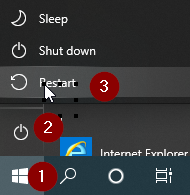

Follow this 3 step process to Restart your workstation/VDI:
1. Select the Windows Icon in the lower left of your workstation
2. Select the Power icon
3. Select Restart.
Comments
0 comments
Article is closed for comments.